Difference between revisions of "Getting Started with BPI-R4"
(→Prepare to develop) |
(→Prepare to develop) |
||
| Line 21: | Line 21: | ||
* Examples: | * Examples: | ||
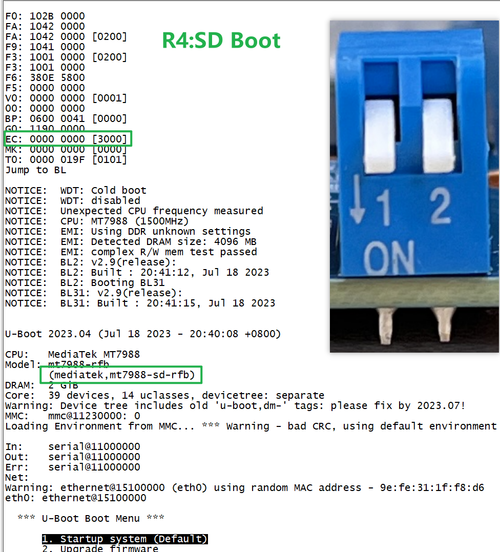
| − | All Jumper is | + | All Jumper is "1", BPI-R4 will boot from SD card |
[[File:R4 SDBOOT.png|500px]] | [[File:R4 SDBOOT.png|500px]] | ||
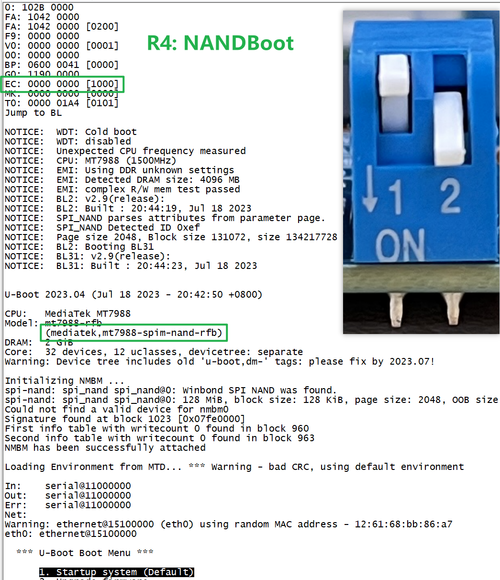
| − | + | SW3-A is "0" and SW3-B is "1" , BPI-R4 will boot from SPI NAND | |
| − | + | [[File:R4 NANDBOOT.png|500px]] | |
| + | |||
| + | |||
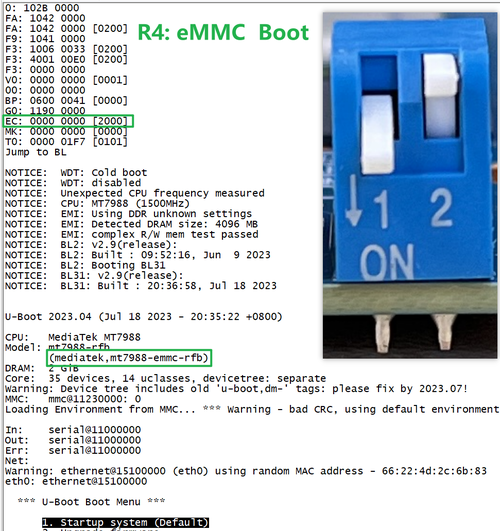
| + | SW3-A is "1" and SW3-B is "0" , BPI-R4 will boot from eMMC | ||
| + | [[File:R4 eMMCBOOT.png|500px]] | ||
Revision as of 01:58, 25 September 2023
Contents
Introduction
MediaTek MT7986(Filogic 830)
Key Features
Development
Basic Development
Prepare to develop
 * Prepare 8G/above TF card, USB-Serial cable, Ubuntu System
 * Using your USB-Serial cable Connect to debug console on BPI-R4

* BPI-R4 bootstrap and device select Jumper Setting

  * Examples:
    All Jumper is "1", BPI-R4 will boot from SD card

SW3-A is "0" and SW3-B is "1" , BPI-R4 will boot from SPI NAND

SW3-A is "1" and SW3-B is "0" , BPI-R4 will boot from eMMC